Showing posts with label ASP.NET MVC. Show all posts

Wednesday, October 7, 2015

Handling Routes Between An AngularJS Application and ASP.NET MVC Application

In this article I will discuss how to handle routing between an AngularJS application that is created within an ASP.NET MVC application. You might have an existing ASP.NET MVC web application that is working all fine but would like to add a Single Page Application using AngularJS to the ASP.NET MVC web application and still allow you to access pages from your angular application and MVC application and vice versa from the same website. While this can be easily achieved with the hash sign (#) that angular routes provide support for by default, the urls generated are not SEO friendly. So you might want to set html5mode to true in angular to allow HTML5 browsers to serve angular pages without adding the hash sign to the urls in the address bar. Since you have an existing ASP.NET MVC application that uses its own routes, adding angular routes that no longer use the hash sign and making it all work can be tricky. Now you have to consider routing back and forth between angular routes and non-angular routes (ASP.NET MVC routes) on the same site.

I will use the default ASP.NET MVC application created in Visual Studio 2013 as an example.

In Visual Studio 2013, create an ASP.NET MVC application project and name it AngularRoutingDemo. I assume you are using IIS to host the website and not the Visual Studio internal IIS server that allocates a port number for your site. So, the address of the site I have configured on IIS is http://localhost/AngularRoutingDemo.

Read More here.

Adding filters to your ELMAH installation

One of the most common configurations people use when setting up ELMAH is email exception logging so that you get notified whenever “shit’s goin’ down” on your site. This leads to a follow on issue that stems from this in that you end up receiving 100’s of emails a couple of times a week as your website gets scanned by evil doers looking for vulnerabilities – but there is a simple and elegant solution.

Many people really rate ELMAH a one of the greatest contributions made to the ASP.Net community to date. Although it has way more history/lineage that its more contemporary peers such as Glimpse or the MiniProfiler, it definitely hasn’t lost any awesomeness over the years.


Read More...

Wednesday, July 24, 2013

Glimpse - A nice tool for ASP.NET for debugging and profiling

I recently got an answer to my google about debugging and profiling in ASP.Net.

Thanks to SCOTT HANSELMAN to write a good article on 'Glimpse' [now sponsored by The Red Gate company].

This article helped me a lot. I thought to share with you friends as it may help you, too.

Wednesday, June 5, 2013

Scaffold your ASP.NET MVC 3 project with the MvcScaffolding package

This post is part of a series about the MvcScaffolding NuGet package:
  1. This post: Scaffold your ASP.NET MVC 3 project with the MvcScaffolding package
  2. Standard usage: Typical use cases and options
  3. One-to-Many Relationships
  4. Scaffolding Actions and Unit Tests
  5. Overriding the T4 templates
  6. Creating custom scaffolders
  7. Scaffolding custom collections of files
Among many other improvements with ASP.NET MVC 3, we’re keen to make it easier to pick up and start using productively if you’re entirely new to the framework, and to automate common development tasks if you’re experienced and already know what you’re doing.
Read more here...

To scaffold multiple controllers in one command?

PM> $models="Products","Reviews"
then to do it automa<T>ically,
PM> foreach($m in $models) { Scaffold Controller $m }

Saturday, April 20, 2013

ASP.NET MVC RAZOR View Engine Overview

ASP.NET MVC contains two view engines named Razor view engine and Web Forms view engine. This post outlines the Razor view syntax, sample code expressions, code blocks, layouts and compares some code expressions with Web Forms view engine.The Razor View engine was introduced in ASP.NET MVC3 and it is default view engine that you get [...]

Read more here.

Sunday, December 9, 2012

The Repository Pattern with EF Code First & Dependency Injection in ASP.NET MVC3


Introduction

These days, I started using EF code first and thought about how could I take advantage from it for my recent project. My project is based on MVC3 and there are some challenges to continue updating this project. At that time, I must finish my job in a very short deadline so fast so good I just define some data access interfaces and implemented them with EF4.
There are some things in my project troubling me:
  • I have used the EF entities in my controllers anywhere that there is a connection translation error throwing infrequently.
  • Modules coupling degree becoming closed.
  • Manage services and contexts life cycle are difficult.
Obviously, it needs to refactor my project with a new architecture designing.

More to read here.

Code First with Entity Framework 5 using MVC4 and MVC Scaffold


Introduction

In this article, I will walk you through a simple application using MVC4 and Entity Framework 5 and will demonstrate how one can make use of code first technology. I will be using MvsScaffold for quick creation of controllers and views. We will be creating a TODO application.

More to read here.

Tuesday, March 6, 2012

Single Page Applications using ASP.NET


What is Single Page Application?
Single Page Application is an architecture for web applications. It combines the best of web and desktop, built with HTML5 and JavaScript.Single Page Applications are rich and responsive. You do not need any browser plug-ins needs to install for this architecture, it is a standard web technology that is going to work on any device, operating system and browser.
You can develop Single Page Applications using ASP.NET MVC\Web Forms technologies.
Benefits
1. Great user experience – It means speed, when it comes to changing of display of user interface and navigate around, we want an instance response from the application which you can get from this architecture.
2. Run on any device
3. Working off-line – It is an interesting benefit which is just becoming possible now.
4. App-store deployable - It is bit advanced programming but you can deploy your applications to windows market place or Apple app-store etc. This is now possible with Phone-gap third party tool for developing apps for mobiles.
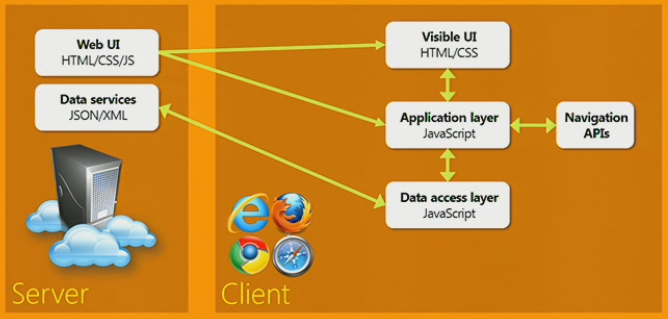
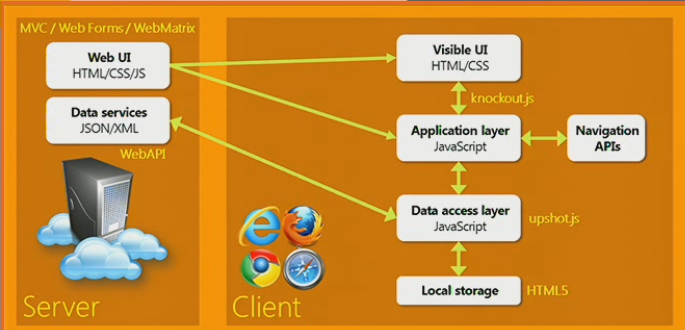
The Architecture diagram looks as below
image

Typical Web architecture contains a server and client, where server contains an endpoint to server HTML/CSS and JS. The client side this being rendered as Visible UI and contains some javascript as well that is web technology.
What is different in Single Page Applications?
With single page web applications, you also tend to have an data end points on server and it is going to return JSON\XML to your application, You can use this data on client data access layer and render that data to UI.
We also want to have fast UI navigation, to done that we have Navigation API which allows you to book marking, navigate forth and back without talking to the server.
We can also make available all right hand side in the diagram offline. You can use local storage apis in HTML5 to work with the data offline.
Using the new Single Page Application project template and scaffolder
Create a new ASP.NET MVC application in Visual Studio, You can install MVC4 beta from here
image
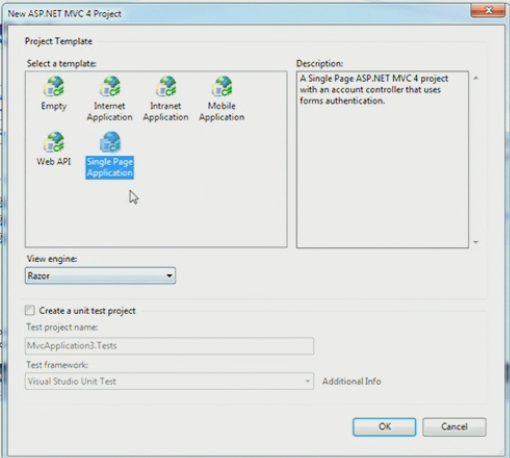
It will prompt you to select the project template there you can select Single Page Application project template as shown below
image
It creates a MVC application but the difference is it creates additional javascript libraries to make it easier for you build single page applications. If you want to use scaffolding then you can use a model class named TodoItem which will be created for you in model folder
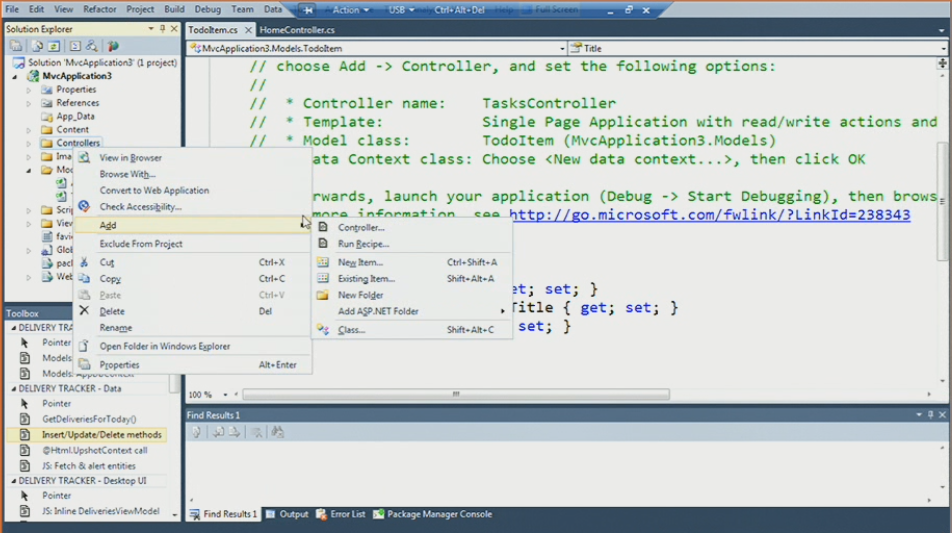
To build a sample Single Page application using scaffolding, Add a controller to your solution
image 
Choose the Single Page application template in controller dialogue box
image
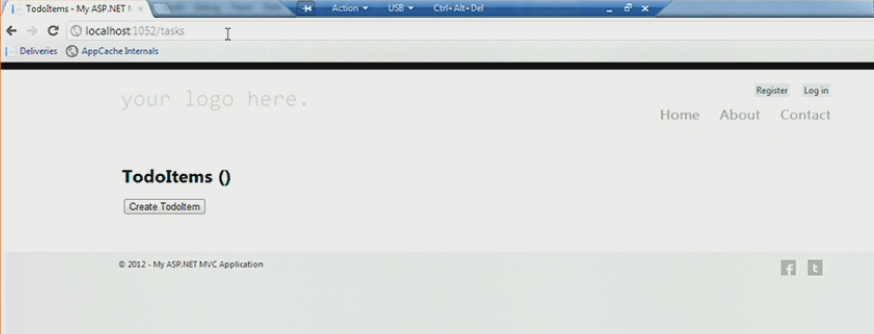
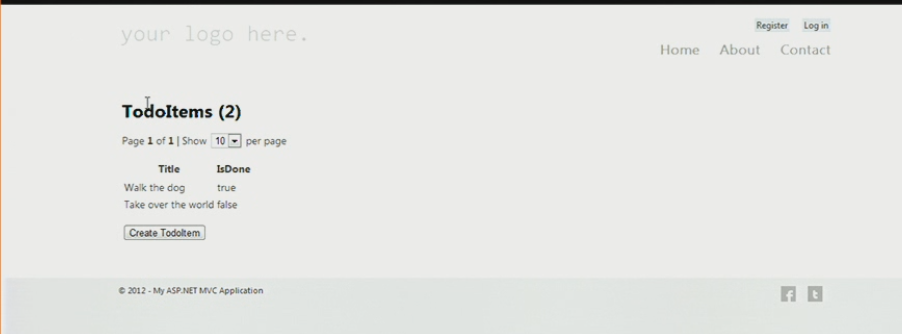
Now run the application then you should be able to see the below output
image
What is different from other scaffolding applications is it follows single page application architecture and when you hit the browser  back and forward it would not talk to the server. It also follows the all principles that we discussed on top.
image
In my next post I am going to discuss about each component in detail and how you can replace them with your own and replacing the scaffolding as well.
image
Each component as shown in the diagram having a specific technology which I can write in next post.

Find a cool free stuff everyday

Giveaway of the Day

Hiren Bharadwa's Posts

DotNetJalps