Showing posts with label Microsoft. Show all posts

Wednesday, June 5, 2013

Microsoft‘s competition to begin from May 29

Startup Village, country's first telecom technology incubator, here is set to host from May 29 the regional round of the prestigious BizSpark India Startup Challenge held by Microsoft, an organiser said.

The event is aimed at searching for entrepreneurs with innovative ideas in cloud computing, mobile applications and Windows 8 business applications.

This is the first time that Kochi has been selected as one of 10 cities to host the challenge, said an organiser.

Winners of the regional rounds will go head-to-head in the national grand finale to be held in Bangalore.

The competition offers cash awards totalling $70,000 and non-cash prizes worth $2 million.

"Microsoft's choice of Startup Village as the host for the challenge is not just an acknowledgement of the tremendous strides we have made over the past one year, it also heralds the arrival of Kochi on India's entrepreneurial map," said Sijo Kuruvilla George, CEO of Startup Village.

The Microsoft BizSpark India Startup Challenge 2013 is open to people who are 18 years or older, citizens or legal residents in India, and are a part of BizSpark Community.

Saturday, January 12, 2013

Creating Shutdown tile in Windows 8


Creating Shutdown tile in Windows 8

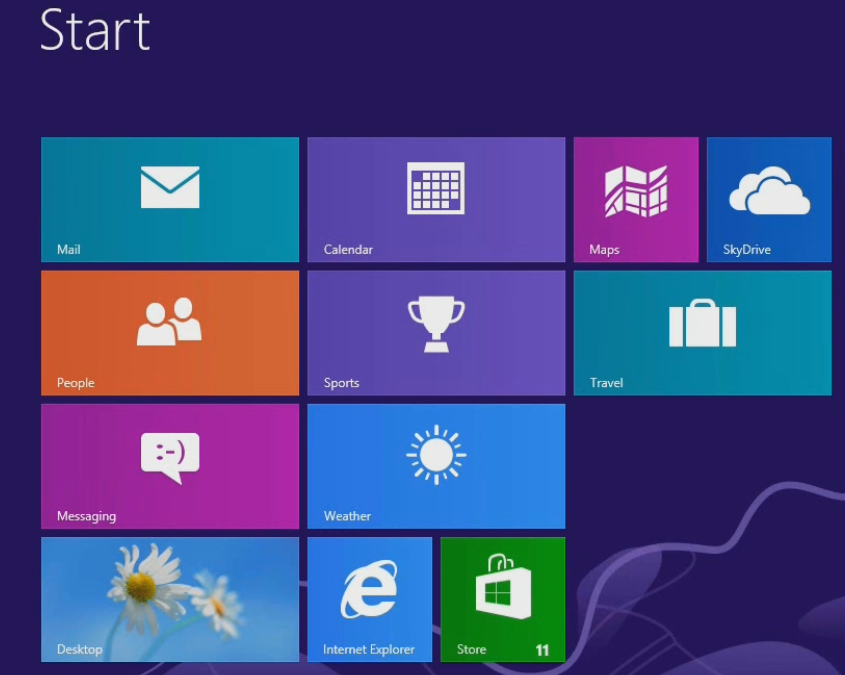
In Windows 8 Start menu was replaced by Start Screen
image 
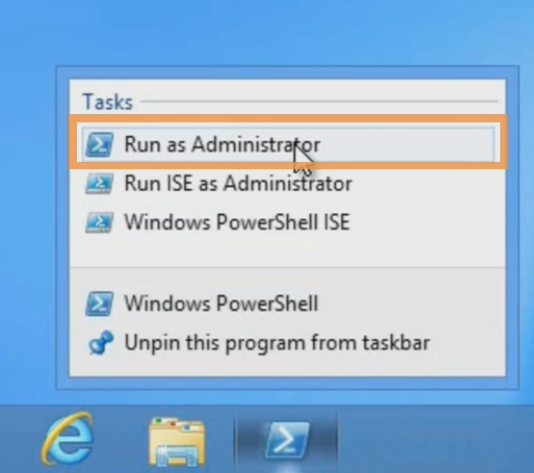
1. Open Windows PowerShell as an administrator
image 
2. After opening a Windows PowerShell you need to write import module command let  and run the below command
image
image
image
if you want three tiles on your screen then you can run the New-OSCWindowsTile directly
image
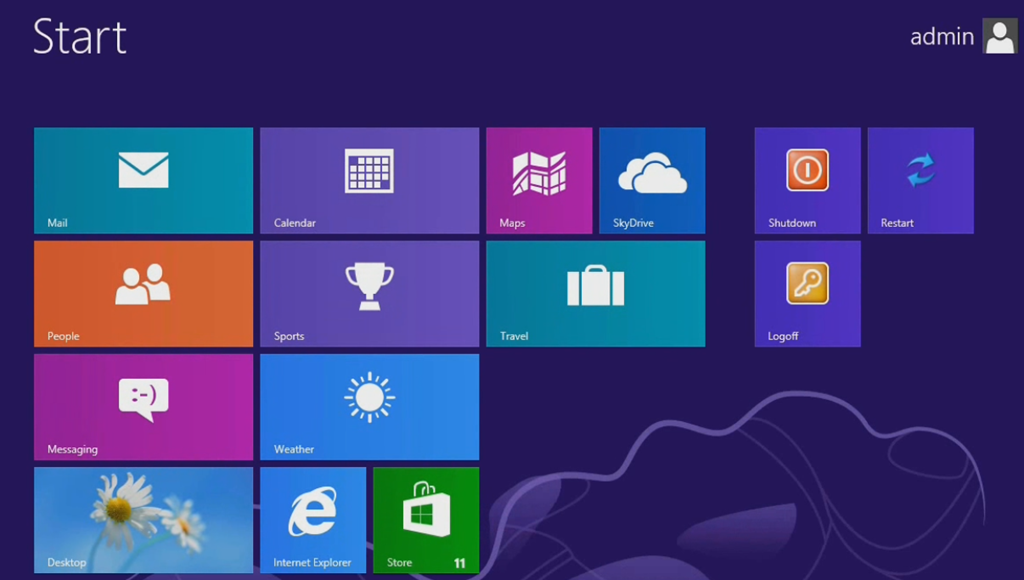
3. Now you can see three tiles on start screen as shown below
image
4. If the execution policy does not allow to run the above commands then you can run the below command first
Set-ExecutionPolicy unrestricted
More on execution policies can be read here

Monday, September 24, 2012

What is new in C# and Visual Basic in Visual Studio 2012


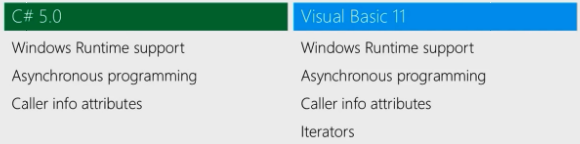
This post discusses the new language features that is introduced in Visual Studio 2012. One of the main things that language team introduced is the idea of producing windows 8 App. These APPs are talking to new API called windows runtime. Small new feature Caller Info Attributes is also added in this release. More about this feature can be read here.
image
This release also brings iterators to Visual Basic. The main discussion in this post is around Asynchronous programming in C# language.
image 
If you want to give importance on responsiveness of client and scalability in server App then you probably call Asynchronous API’s. These API’s take Callbacks as parameters and uses that Callback to notify you about result of available. When you start write these call backs then it is harder maintain the code but with new Async language support that introduced in  Visual Basic and C# and it is easy consume these API’s.
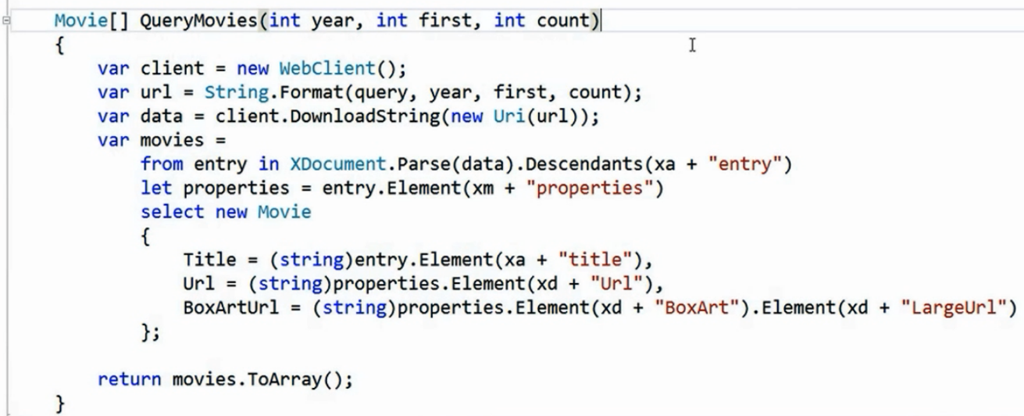
Below is the synchronous code in C#
image
The code basically Searches the movie index in Netflix using OData by taking Year as parameter. While it is downloading the movies using above code , you can notice you can not interact with your user interface. You can scroll along UI and explore the movies only after the search operation is complete. Users expects more responsive apps.
Why the above code is Unresponsive? 
The call to DownloadString is of webclient type and it asks you to wait till it returns string. During this process your UI is going to hang-up and holds the thread until it returns the result back you.
Two different options here, you can put this code on background Thread and it is bit complicated. You may have to marshal and unmarshal the code. The second option is to interact with Asynchronous API there you have an overloaded function DownloadStringAsync, But when you use this method you are no longer take back data as result. You need to sign-up a call-back when a result is available. If you have multiple Async calls then you have to write multiple call-backs. In this case your code is getting more difficult to understand.
Solution
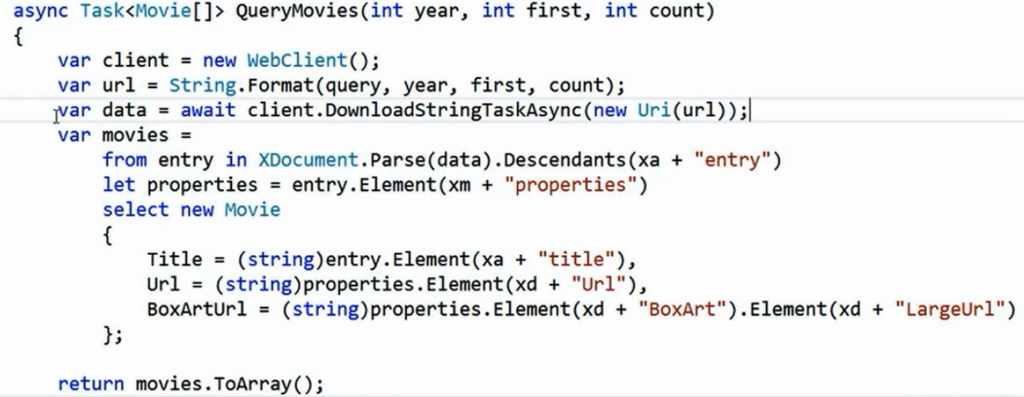
The new overload method is DownloadStringTaskAsync, This method now returns string of type Task, Task of string is object that notify you when result is available. Now you can change the signature of the method QueryMovies and mark this as async. This tells the compiler that this method is pausable and resumeable , they can wait without locking to the UI thread. Now change the return type of method from Movie array to Task<Movie[]> array. Write a word await to get the string from Task of objects from DownloadStringTaskAsync call.
image
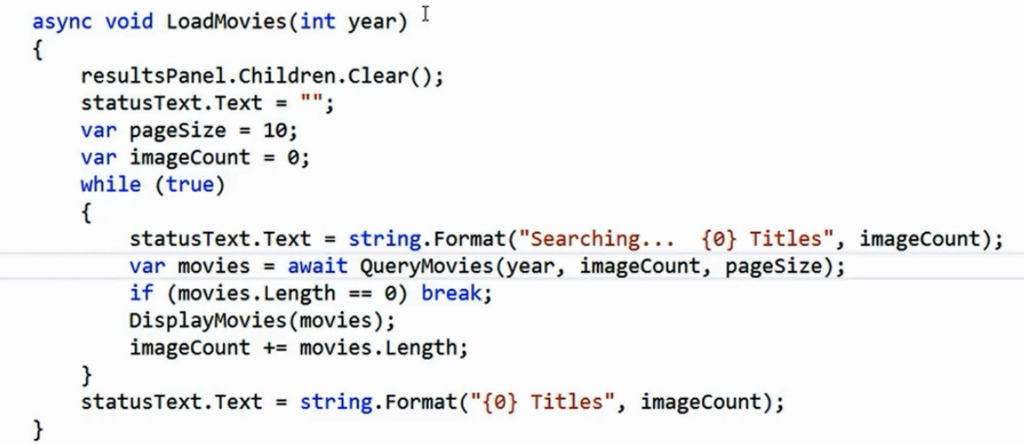
Now you can call the above even from while loop
image
The compiler is now able to figure out how to handle the await inside the while loop and resume it when it gets the result. Now you should be able to interact with your UI without any hang-ups.
Reference: Alex Turner talk in Visual Studio launch

Caller Info Attributes in C# 5.0


Caller Info Attributes is a new feature in C# 5.0, Caller Info Attributes instructs the compiler to obtain and feed information into the parameter’s default value. You can tag optional parameters using Caller Info Attributes.
image
Three Caller Info Attributes are
  • [CallerMemberName]  – It applies the caller’s member name
  • [CallerFilePath] -  It applies the path to the caller’s source code file
  • [CallerLineNumber]-  It applies the line number in the caller’s source code file
The below piece of code demonstrates all three attributes
   1: using System;

   2: using System.Runtime.CompilerServices;

   3: class Program

   4: {

   5: static void Main()

   6: {

   7:   Demo();

   8: }

   9: static void Demo (

  10: [CallerMemberName] string memberName = null,

  11: [CallerFilePath] string filePath = null,

  12: [CallerLineNumber] int lineNumber = 0)

  13: {

  14:    Console.WriteLine (memberName);

  15:    Console.WriteLine (filePath);

  16:    Console.WriteLine (lineNumber);

  17: }

  18: }
The output of the code as below
Main
C:\Projects\Program.cs (Assuming your project is located in this path)
16
Caller Info attributes are useful for writing logging functions and for implementing change notification patterns. The following method can be called from property’s set accessor
   1: void RaisePropertyChanged( [CallMemberName] string propertyName = null)

   2: {

   3:  

   4: }
More can be read here

Friday, December 16, 2011

Silverlight goes to version 5, Microsoft almost embarassed to announce it

Microsoft has announced the next generation of Silverlight, version 5, is now available for clients and developers.
While they made their target (just – they originally said “by the end of 2011”), Microsoft’s growing move towards modern web technologies such as HTML 5 and CSS 3 and away from Silverlight is becoming clear. For example, the release was publicised by a single blog post on MSDN, and made public at 9pm on a Friday – probably the second worst time you could possibly choose (after 3am on a Sunday) to make an announcement you actually want people to hear about.
It’s not as if Silverlight 5 doesn’t come with a bunch of features SL devs won’t like – it’s packed with new features that enrich the platform (even if it is dying). There’s a whole 3D stack included in an XNA 3D API, with built in effects and a full XNA content pipeline. H.264 (unprotected) is decoded in hardware, XNA boosts low-latency sound, P/Invoke, multiple windows, 64-bit support in Windows, Full Trust mode for enterprise with unrestricted filesystem access, and all kinds of other features.
However it seems Silverlight’s days are numbered, as Microsoft moves to HTML 5 for its Windows 8 tile apps and improves its support in IE 10. If you’re still interested, you can get it from Silverlight.net.

Monday, October 24, 2011

Application Lifecycle Management in Visual Studio 11

This post discusses about new Application Lifecycle Management features in Visual Studio 11. Application Lifecycle Management represents how do you prioritize your requirement, how do you breakdown them into tasks and how do you implement those tasks.

image 

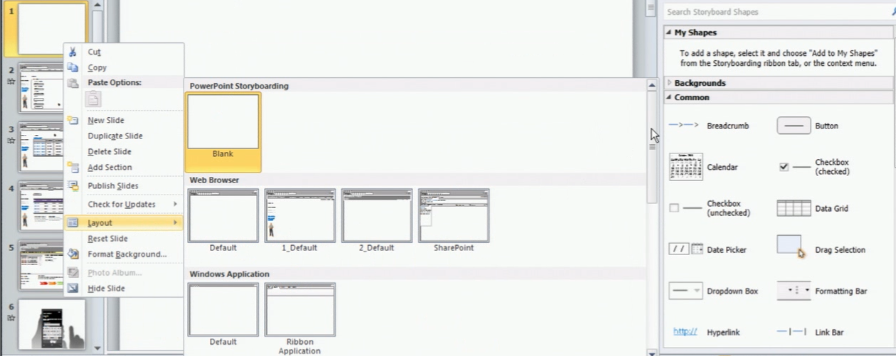
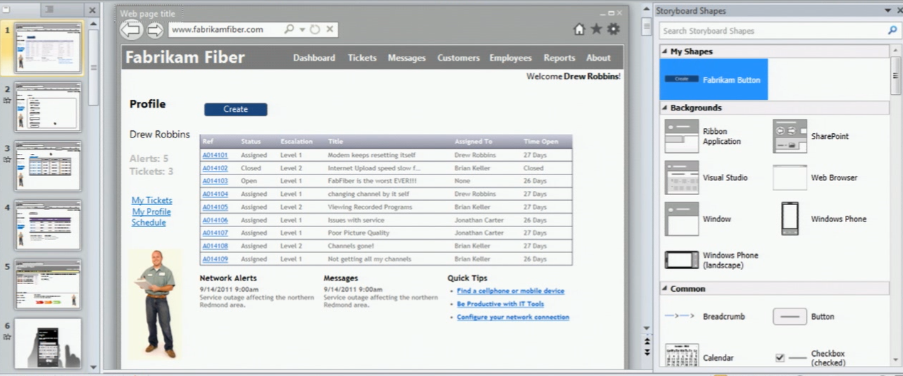
Start with the Requirements, Visual Studio 11 coming up with new tool PowerPoint Storyboarding which you can use for visualise your customer requirements without writing a single line of code.


image

You will be presenting with different templates and layouts to author  the requirements

image

You  can also add various visual elements like button, grid etc to your slide and can add animation to tell your developers what you want to see when click some button in your screen.

image

You can quickly build the mockups using this new tab storyboarding in PowerPoint. Now we got the requirements and need to put in project management to describe what priority you are giving to these requirements and how do you deal with them?

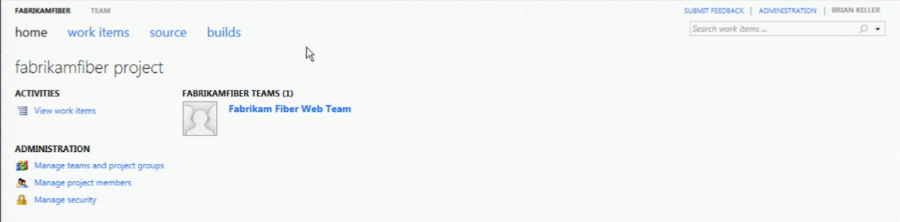
We can do this project management using Visual Studio Team Foundation Server. Visual Studio 11 Team Web Access enhances the developer experience with some new features.

The new Team Web Access looks as below

image

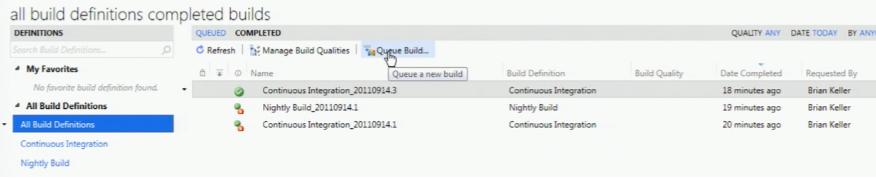
Build Reports using Queue build is a new feature in 11 version

image

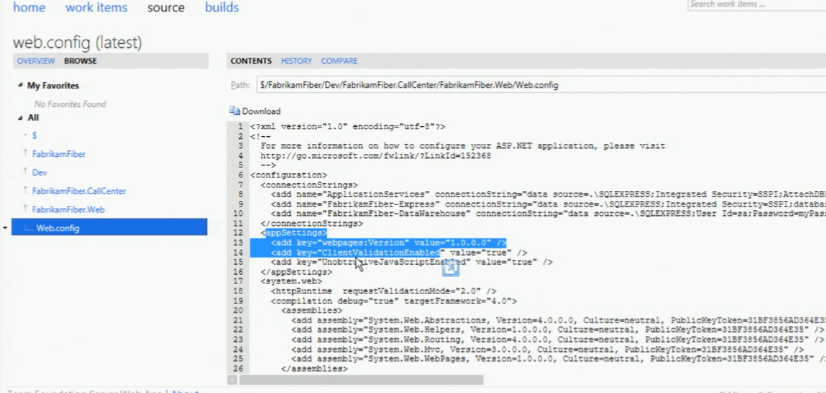
You can make changes to your files under source control using Team Web Access

image

This feature is not go developers to go and use team web access use for check in and check out the files. You can use this to edit the configuration files quickly if there is any change and build the reports quickly.

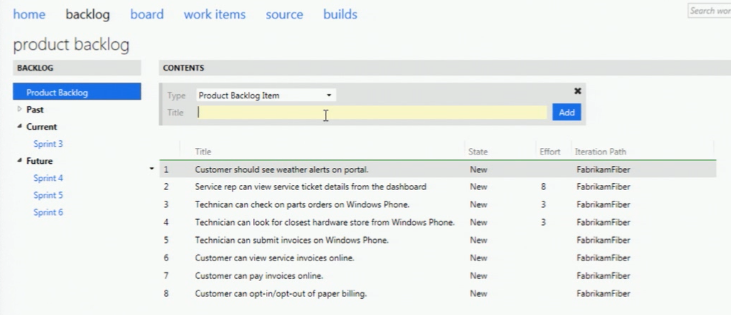
Now you can create teams and their identity and can assign the product backlog for the team using Team Web Access

image

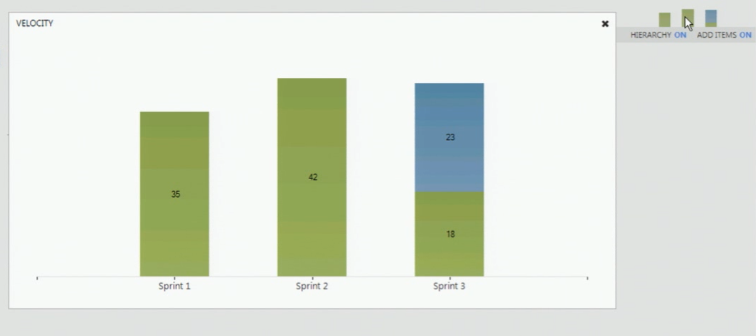
You can prioritize the work-items by just drag and drop these items in team web access. Now you have the velocity charts which represents the story points assigned to the tasks to your team members.

image

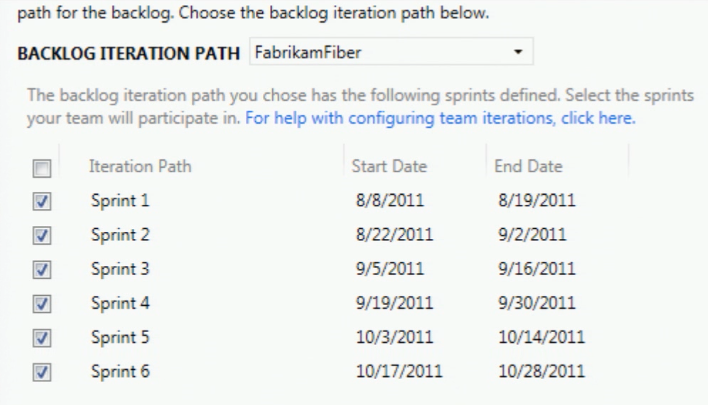
Now TFS web access having the dates for your iterations

image

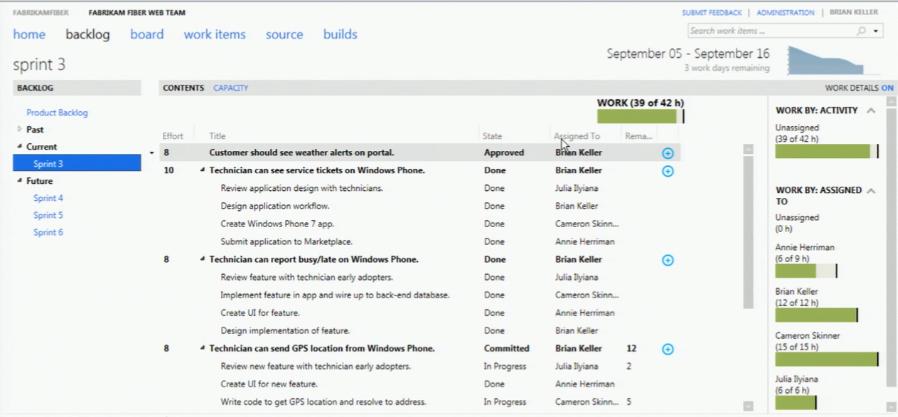
The Sprint screen in Team Web Access looks as below

image

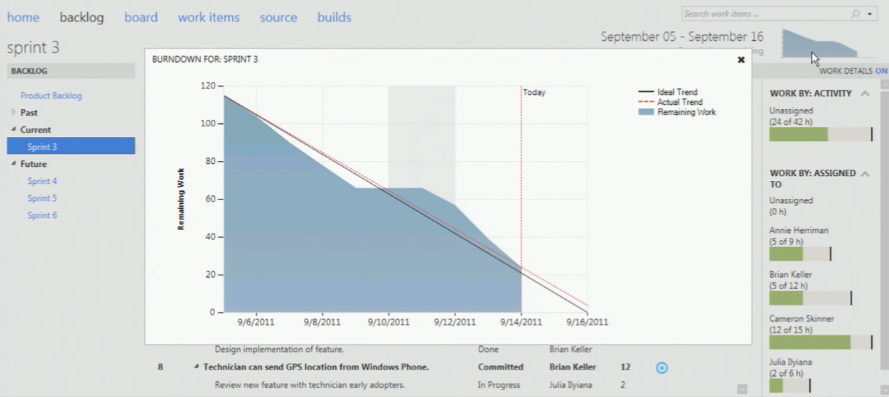
sprint is where you break your product backlog items and assign a time-period and resources to it. You also got the burndown chart in this version which updates real-time with your work-items. Earlier it took time to update till you complete the TFS reports generation.

image

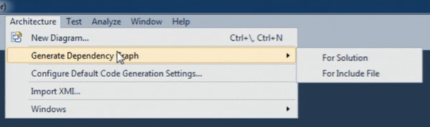
Generating Dependency graph is easy using architecture menu where you can find the dependency between assemblies in your solution. This feature is also available in Visual Studio 2010.

image

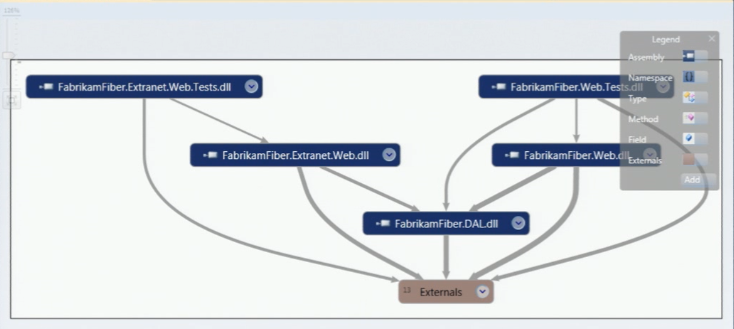
It then generates the graph as shown below

image

In Visual Studio 2010 if your solution is big one then you may need lot of memory to generate these graphs every-time when you choose this option where as in 11 these results are stored in cache and generates the results quickly from cache. It shows the links down to the method level in your solution.

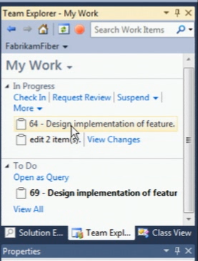
The new team explorer looks new with some new features

image

The suspend link allows you to save all your current work including breakpoints and multiple monitor screens(window positions) if some one asks you to drop off what you are doing now and do a new high-priority work.

You can now search for new work-items within your team explorer. Now it clearly shows what you are doing and what are the incoming requests from other team-members like code-review request etc.

image

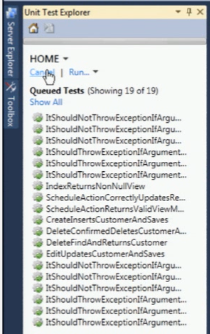
In Visual Studio 11 it supports unit test cases that you have written in Nunit, Xunit and MS-Test. All your test cases now appear in Unit Explorer.

image

There is a new tool in Visual Studio 11 which Analyses your code and finds the similar clones in the solution

image

Analyze Solution for Code Clones identifies the blocks of code that are identical and differ in few lines. This tool is a good candidate for refactoring your code.You can also find code clones from individual files.

image

Select the piece of code which you want to find the clone and say find matching clones in solution.

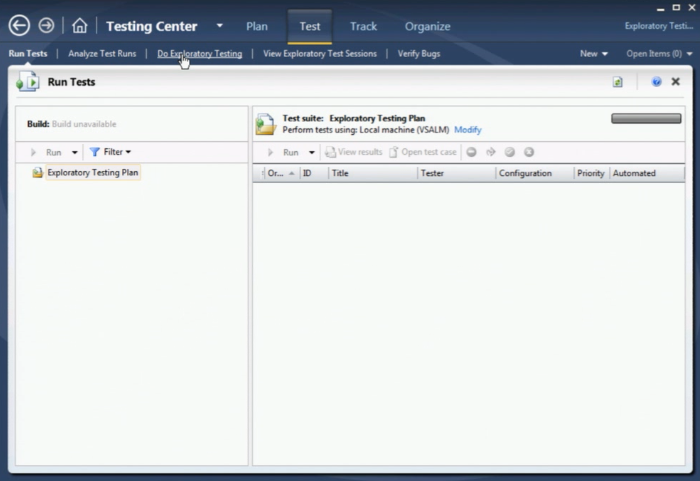
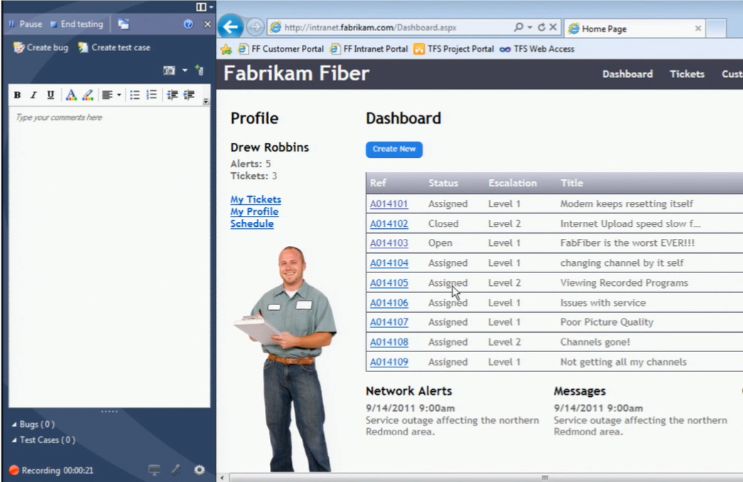
Exploratory testing is something new feature in Visual Studio 11 where you can fire-up your application take the screen shot and save as test case.

image

It records every action when explore this test and create a bug

image

Reference: Cameron session from BUILD.

Monday, October 17, 2011

Microsoft finalises Skype deal - Video chat service company will run as a division of Microsoft

Microsoft has finalised its purchase of internet video chat service Skype for $8.5 billion.

The deal was first announced five months ago and was completed on Thursday.

According to the Press Association, Microsoft has hopes that Skype will help it catch up in the social networking, mobile phone and digital video market segments.


Skype has approximately 170m users worldwide, who created around 207 billion minutes of voice and video calls last year, adding up to almost 400,000 years' worth.

Skype will operate as a division within the Microsoft and Skype CEO Tony Bates is joining Microsoft to run the division and will report to Microsoft CEO Steve Ballmer.

Tuesday, October 11, 2011

What is NET Framework Client Profile?

Straight from the Microsoft castle:

What is it:
The .NET Framework 4 Client Profile is a subset of the .NET Framework 4 that is optimized for client applications. It provides functionality for most client applications, including Windows Presentation Foundation (WPF), Windows Forms, Windows Communication Foundation (WCF), and ClickOnce features.

Why:
This enables faster deployment and a smaller install package for applications that target the .NET Framework 4 Client Profile.

.NET Framework Client Profile:

 http://msdn.microsoft.com/en-us/library/cc656912.aspx

Friday, August 5, 2011

Fastest way to reference an assembly in Visual Studio; Remove Unused References

An extension tool named  "Muse.VSExtensions" makes it very easier to reference an assembly in Visual Studio. It Also Provides option to remove unused references from the project also. even it helps to copy all references from one project to another.

You can download this tool from here.


Make it easy to change default browser in MSVS

Currently is it a pain to change the currently default browser, you've to use File->Browse With... and the a few more clicks to select the browser, "Set As Default" button, etc. Moreover, if you're working with a ASP.NET MVC flavor project, this command will be disabled, thus making it even harder to change the default browser...

You can read more about this suggestion here from Scott Hanselman:

http://www.hanselman.com/blog/HowToChangeTheDefaultBrowserInVisualStudioProgrammaticallyWithPowerShellAndPossiblyPokeYourselfInTheEye.aspx

and here from the WoVS blog:

http://blog.wovs.com/2010/08/make-it-easy-to-change-default-browser.html

IF YOU WOULD LIKE MICROSOFT to add such a feature in the next version of Visual Studio PLEASE VOTE HERE!!

But until Microsoft provides this feature inbuilt we can use a Free Tool named "WoVS Default Browser Switcher".

You can download this tool from here.


If you like this post, then please +1 this post from below toolbar.

Thanks,
Vihang Shah

Monday, August 1, 2011

C# Version Wise Features


C# 2.0


  • Generics
  • Partial types
  • Anonymous methods
  • Iterators
  • Nullable types
  • Private setters (properties)
  • Method group conversions (delegates)


C# 3.0


  • Implicitly typed local variables
  • Object and collection initializers
  • Auto-Implemented properties
  • Anonymous types
  • Extension methods
  • Query expressions
  • Lambda expressions
  • Expression trees


C# 4.0

New features Whitepaper


  • Dynamic binding
  • Named and optional arguments
  • Generic co- and contravariance


C# 5.0 (planned)


  • Asynchronous methods
  • Compiler as a service

Friday, July 22, 2011

SQLHelper by Microsoft

using System;
using System.Data;
using System.Xml;
using System.Data.SqlClient;
using System.Collections;

namespace Microsoft.ApplicationBlocks.Data
{
    public sealed class SqlHelper
    {
        #region private utility methods & constructors
        private SqlHelper() { }
        private static void AttachParameters(SqlCommand command, SqlParameter[] commandParameters)
        {
            foreach (SqlParameter p in commandParameters)
            {
                if ((p.Direction == ParameterDirection.InputOutput) && (p.Value == null))
                {
                    p.Value = DBNull.Value;
                }
                command.Parameters.Add(p);
            }
        }
        private static void AssignParameterValues(SqlParameter[] commandParameters, object[] parameterValues)
        {
            if ((commandParameters == null) || (parameterValues == null))
            {
                return;
            }
            if (commandParameters.Length != parameterValues.Length)
            {
                throw new ArgumentException("Parameter count does not match Parameter Value count.");
            }
            for (int i = 0, j = commandParameters.Length; i < j; i++)
            {
                commandParameters[i].Value = parameterValues[i];
            }
        }
        private static void PrepareCommand(SqlCommand command, SqlConnection connection, SqlTransaction transaction, CommandType commandType, string commandText, SqlParameter[] commandParameters)
        {
            if (connection.State != ConnectionState.Open)
            {
                connection.Open();
            }
            command.Connection = connection;
            command.CommandText = commandText;
            if (transaction != null)
            {
                command.Transaction = transaction;
            }
            command.CommandType = commandType;
            if (commandParameters != null)
            {
                AttachParameters(command, commandParameters);
            }
            return;
        }
        #endregion private utility methods & constructors
        #region ExecuteNonQuery
        public static int ExecuteNonQuery(string connectionString, CommandType commandType, string commandText)
        {
            return ExecuteNonQuery(connectionString, commandType, commandText, (SqlParameter[])null);
        }
        public static int ExecuteNonQuery(string connectionString, CommandType commandType, string commandText, params SqlParameter[] commandParameters)
        {
            using (SqlConnection cn = new SqlConnection(connectionString))
            {
                cn.Open();
                return ExecuteNonQuery(cn, commandType, commandText, commandParameters);
            }
        }
        public static int ExecuteNonQuery(string connectionString, string spName, params object[] parameterValues)
        {
            if ((parameterValues != null) && (parameterValues.Length > 0))
            {
                SqlParameter[] commandParameters = SqlHelperParameterCache.GetSpParameterSet(connectionString, spName);
                AssignParameterValues(commandParameters, parameterValues);
                return ExecuteNonQuery(connectionString, CommandType.StoredProcedure, spName, commandParameters);
            }
            else
            {
                return ExecuteNonQuery(connectionString, CommandType.StoredProcedure, spName);
            }
        }
        public static int ExecuteNonQuery(SqlConnection connection, CommandType commandType, string commandText)
        {
            return ExecuteNonQuery(connection, commandType, commandText, (SqlParameter[])null);
        }
        public static int ExecuteNonQuery(SqlConnection connection, CommandType commandType, string commandText, params SqlParameter[] commandParameters)
        {
            SqlCommand cmd = new SqlCommand();
            PrepareCommand(cmd, connection, (SqlTransaction)null, commandType, commandText, commandParameters);
            int retval = cmd.ExecuteNonQuery();
            cmd.Parameters.Clear();
            return retval;
        }
        public static int ExecuteNonQuery(SqlConnection connection, string spName, params object[] parameterValues)
        {
            if ((parameterValues != null) && (parameterValues.Length > 0))
            {
                SqlParameter[] commandParameters = SqlHelperParameterCache.GetSpParameterSet(connection.ConnectionString, spName);
                AssignParameterValues(commandParameters, parameterValues);
                return ExecuteNonQuery(connection, CommandType.StoredProcedure, spName, commandParameters);
            }
            else
            {
                return ExecuteNonQuery(connection, CommandType.StoredProcedure, spName);
            }
        }
        public static int ExecuteNonQuery(SqlTransaction transaction, CommandType commandType, string commandText)
        {
            return ExecuteNonQuery(transaction, commandType, commandText, (SqlParameter[])null);
        }
        public static int ExecuteNonQuery(SqlTransaction transaction, CommandType commandType, string commandText, params SqlParameter[] commandParameters)
        {
            SqlCommand cmd = new SqlCommand();
            PrepareCommand(cmd, transaction.Connection, transaction, commandType, commandText, commandParameters);
            int retval = cmd.ExecuteNonQuery();
            cmd.Parameters.Clear();
            return retval;
        }
        public static int ExecuteNonQuery(SqlTransaction transaction, string spName, params object[] parameterValues)
        {
            if ((parameterValues != null) && (parameterValues.Length > 0))
            {
                SqlParameter[] commandParameters = SqlHelperParameterCache.GetSpParameterSet(transaction.Connection.ConnectionString, spName);
                AssignParameterValues(commandParameters, parameterValues);
                return ExecuteNonQuery(transaction, CommandType.StoredProcedure, spName, commandParameters);
            }
            else
            {
                return ExecuteNonQuery(transaction, CommandType.StoredProcedure, spName);
            }
        }
        #endregion ExecuteNonQuery
        #region ExecuteDataSet
        public static DataSet ExecuteDataset(string connectionString, CommandType commandType, string commandText)
        {
            return ExecuteDataset(connectionString, commandType, commandText, (SqlParameter[])null);
        }
        public static DataSet ExecuteDataset(string connectionString, CommandType commandType, string commandText, params SqlParameter[] commandParameters)
        {
            using (SqlConnection cn = new SqlConnection(connectionString))
            {
                cn.Open();
                return ExecuteDataset(cn, commandType, commandText, commandParameters);
            }
        }
        public static DataSet ExecuteDataset(string connectionString, string spName, params object[] parameterValues)
        {
            if ((parameterValues != null) && (parameterValues.Length > 0))
            {
                SqlParameter[] commandParameters = SqlHelperParameterCache.GetSpParameterSet(connectionString, spName);
                AssignParameterValues(commandParameters, parameterValues);
                return ExecuteDataset(connectionString, CommandType.StoredProcedure, spName, commandParameters);
            }
            else
            {
                return ExecuteDataset(connectionString, CommandType.StoredProcedure, spName);
            }
        }
        public static DataSet ExecuteDataset(SqlConnection connection, CommandType commandType, string commandText)
        {
            return ExecuteDataset(connection, commandType, commandText, (SqlParameter[])null);
        }
        public static DataSet ExecuteDataset(SqlConnection connection, CommandType commandType, string commandText, params SqlParameter[] commandParameters)
        {
            SqlCommand cmd = new SqlCommand();
            PrepareCommand(cmd, connection, (SqlTransaction)null, commandType, commandText, commandParameters);
            SqlDataAdapter da = new SqlDataAdapter(cmd);
            DataSet ds = new DataSet();
            da.Fill(ds);
            cmd.Parameters.Clear();
            return ds;
        }
        public static DataSet ExecuteDataset(SqlConnection connection, string spName, params object[] parameterValues)
        {
            if ((parameterValues != null) && (parameterValues.Length > 0))
            {
                SqlParameter[] commandParameters = SqlHelperParameterCache.GetSpParameterSet(connection.ConnectionString, spName);
                AssignParameterValues(commandParameters, parameterValues);
                return ExecuteDataset(connection, CommandType.StoredProcedure, spName, commandParameters);
            }
            else
            {
                return ExecuteDataset(connection, CommandType.StoredProcedure, spName);
            }
        }
        public static DataSet ExecuteDataset(SqlTransaction transaction, CommandType commandType, string commandText)
        {
            return ExecuteDataset(transaction, commandType, commandText, (SqlParameter[])null);
        }
        public static DataSet ExecuteDataset(SqlTransaction transaction, CommandType commandType, string commandText, params SqlParameter[] commandParameters)
        {
            SqlCommand cmd = new SqlCommand();
            PrepareCommand(cmd, transaction.Connection, transaction, commandType, commandText, commandParameters);
            SqlDataAdapter da = new SqlDataAdapter(cmd);
            DataSet ds = new DataSet();
            da.Fill(ds);
            cmd.Parameters.Clear();
            return ds;
        }
        public static DataSet ExecuteDataset(SqlTransaction transaction, string spName, params object[] parameterValues)
        {
            if ((parameterValues != null) && (parameterValues.Length > 0))
            {
                SqlParameter[] commandParameters = SqlHelperParameterCache.GetSpParameterSet(transaction.Connection.ConnectionString, spName);
                AssignParameterValues(commandParameters, parameterValues);
                return ExecuteDataset(transaction, CommandType.StoredProcedure, spName, commandParameters);
            }
            else
            {
                return ExecuteDataset(transaction, CommandType.StoredProcedure, spName);
            }
        }
        #endregion ExecuteDataSet
        #region ExecuteReader
        private enum SqlConnectionOwnership
        {
            Internal,
            External
        }
        private static SqlDataReader ExecuteReader(SqlConnection connection, SqlTransaction transaction, CommandType commandType, string commandText, SqlParameter[] commandParameters, SqlConnectionOwnership connectionOwnership)
        {
            SqlCommand cmd = new SqlCommand();
            PrepareCommand(cmd, connection, transaction, commandType, commandText, commandParameters);
            SqlDataReader dr;
            if (connectionOwnership == SqlConnectionOwnership.External)
            {
                dr = cmd.ExecuteReader();
            }
            else
            {
                dr = cmd.ExecuteReader(CommandBehavior.CloseConnection);
            }
            cmd.Parameters.Clear();
            return dr;
        }
        public static SqlDataReader ExecuteReader(string connectionString, CommandType commandType, string commandText)
        {
            return ExecuteReader(connectionString, commandType, commandText, (SqlParameter[])null);
        }
        public static SqlDataReader ExecuteReader(string connectionString, CommandType commandType, string commandText, params SqlParameter[] commandParameters)
        {
            SqlConnection cn = new SqlConnection(connectionString);
            cn.Open();
            try
            {
                return ExecuteReader(cn, null, commandType, commandText, commandParameters, SqlConnectionOwnership.Internal);
            }
            catch
            {
                cn.Close();
                throw;
            }
        }
        public static SqlDataReader ExecuteReader(string connectionString, string spName, params object[] parameterValues)
        {
            if ((parameterValues != null) && (parameterValues.Length > 0))
            {
                SqlParameter[] commandParameters = SqlHelperParameterCache.GetSpParameterSet(connectionString, spName);
                AssignParameterValues(commandParameters, parameterValues);
                return ExecuteReader(connectionString, CommandType.StoredProcedure, spName, commandParameters);
            }
            else
            {
                return ExecuteReader(connectionString, CommandType.StoredProcedure, spName);
            }
        }
        public static SqlDataReader ExecuteReader(SqlConnection connection, CommandType commandType, string commandText)
        {
            return ExecuteReader(connection, commandType, commandText, (SqlParameter[])null);
        }
        public static SqlDataReader ExecuteReader(SqlConnection connection, CommandType commandType, string commandText, params SqlParameter[] commandParameters)
        {
            return ExecuteReader(connection, (SqlTransaction)null, commandType, commandText, commandParameters, SqlConnectionOwnership.External);
        }
        public static SqlDataReader ExecuteReader(SqlConnection connection, string spName, params object[] parameterValues)
        {
            if ((parameterValues != null) && (parameterValues.Length > 0))
            {
                SqlParameter[] commandParameters = SqlHelperParameterCache.GetSpParameterSet(connection.ConnectionString, spName);
                AssignParameterValues(commandParameters, parameterValues);
                return ExecuteReader(connection, CommandType.StoredProcedure, spName, commandParameters);
            }
            else
            {
                return ExecuteReader(connection, CommandType.StoredProcedure, spName);
            }
        }
        public static SqlDataReader ExecuteReader(SqlTransaction transaction, CommandType commandType, string commandText)
        {
            return ExecuteReader(transaction, commandType, commandText, (SqlParameter[])null);
        }
        public static SqlDataReader ExecuteReader(SqlTransaction transaction, CommandType commandType, string commandText, params SqlParameter[] commandParameters)
        {
            return ExecuteReader(transaction.Connection, transaction, commandType, commandText, commandParameters, SqlConnectionOwnership.External);
        }
        public static SqlDataReader ExecuteReader(SqlTransaction transaction, string spName, params object[] parameterValues)
        {
            if ((parameterValues != null) && (parameterValues.Length > 0))
            {
                SqlParameter[] commandParameters = SqlHelperParameterCache.GetSpParameterSet(transaction.Connection.ConnectionString, spName);
                AssignParameterValues(commandParameters, parameterValues);
                return ExecuteReader(transaction, CommandType.StoredProcedure, spName, commandParameters);
            }
            else
            {
                return ExecuteReader(transaction, CommandType.StoredProcedure, spName);
            }
        }
        #endregion ExecuteReader
        #region ExecuteScalar
        public static object ExecuteScalar(string connectionString, CommandType commandType, string commandText)
        {
            return ExecuteScalar(connectionString, commandType, commandText, (SqlParameter[])null);
        }
        public static object ExecuteScalar(string connectionString, CommandType commandType, string commandText, params SqlParameter[] commandParameters)
        {
            using (SqlConnection cn = new SqlConnection(connectionString))
            {
                cn.Open();
                return ExecuteScalar(cn, commandType, commandText, commandParameters);
            }
        }
        public static object ExecuteScalar(string connectionString, string spName, params object[] parameterValues)
        {
            if ((parameterValues != null) && (parameterValues.Length > 0))
            {
                SqlParameter[] commandParameters = SqlHelperParameterCache.GetSpParameterSet(connectionString, spName);
                AssignParameterValues(commandParameters, parameterValues);
                return ExecuteScalar(connectionString, CommandType.StoredProcedure, spName, commandParameters);
            }
            else
            {
                return ExecuteScalar(connectionString, CommandType.StoredProcedure, spName);
            }
        }
        public static object ExecuteScalar(SqlConnection connection, CommandType commandType, string commandText)
        {
            return ExecuteScalar(connection, commandType, commandText, (SqlParameter[])null);
        }
        public static object ExecuteScalar(SqlConnection connection, CommandType commandType, string commandText, params SqlParameter[] commandParameters)
        {
            SqlCommand cmd = new SqlCommand();
            PrepareCommand(cmd, connection, (SqlTransaction)null, commandType, commandText, commandParameters);
            object retval = cmd.ExecuteScalar();
            cmd.Parameters.Clear();
            return retval;
        }
        public static object ExecuteScalar(SqlConnection connection, string spName, params object[] parameterValues)
        {
            if ((parameterValues != null) && (parameterValues.Length > 0))
            {
                SqlParameter[] commandParameters = SqlHelperParameterCache.GetSpParameterSet(connection.ConnectionString, spName);
                AssignParameterValues(commandParameters, parameterValues);
                return ExecuteScalar(connection, CommandType.StoredProcedure, spName, commandParameters);
            }
            else
            {
                return ExecuteScalar(connection, CommandType.StoredProcedure, spName);
            }
        }
        public static object ExecuteScalar(SqlTransaction transaction, CommandType commandType, string commandText)
        {
            return ExecuteScalar(transaction, commandType, commandText, (SqlParameter[])null);
        }
        public static object ExecuteScalar(SqlTransaction transaction, CommandType commandType, string commandText, params SqlParameter[] commandParameters)
        {
            SqlCommand cmd = new SqlCommand();
            PrepareCommand(cmd, transaction.Connection, transaction, commandType, commandText, commandParameters);
            object retval = cmd.ExecuteScalar();
            cmd.Parameters.Clear();
            return retval;
        }
        public static object ExecuteScalar(SqlTransaction transaction, string spName, params object[] parameterValues)
        {
            if ((parameterValues != null) && (parameterValues.Length > 0))
            {
                SqlParameter[] commandParameters = SqlHelperParameterCache.GetSpParameterSet(transaction.Connection.ConnectionString, spName);
                AssignParameterValues(commandParameters, parameterValues);
                return ExecuteScalar(transaction, CommandType.StoredProcedure, spName, commandParameters);
            }
            else
            {
                return ExecuteScalar(transaction, CommandType.StoredProcedure, spName);
            }
        }
        #endregion ExecuteScalar
        #region ExecuteXmlReader
        public static XmlReader ExecuteXmlReader(SqlConnection connection, CommandType commandType, string commandText)
        {
            return ExecuteXmlReader(connection, commandType, commandText, (SqlParameter[])null);
        }
        public static XmlReader ExecuteXmlReader(SqlConnection connection, CommandType commandType, string commandText, params SqlParameter[] commandParameters)
        {
            SqlCommand cmd = new SqlCommand();
            PrepareCommand(cmd, connection, (SqlTransaction)null, commandType, commandText, commandParameters);
            XmlReader retval = cmd.ExecuteXmlReader();
            cmd.Parameters.Clear();
            return retval;
        }
        public static XmlReader ExecuteXmlReader(SqlConnection connection, string spName, params object[] parameterValues)
        {
            if ((parameterValues != null) && (parameterValues.Length > 0))
            {
                SqlParameter[] commandParameters = SqlHelperParameterCache.GetSpParameterSet(connection.ConnectionString, spName);
                AssignParameterValues(commandParameters, parameterValues);
                return ExecuteXmlReader(connection, CommandType.StoredProcedure, spName, commandParameters);
            }
            else
            {
                return ExecuteXmlReader(connection, CommandType.StoredProcedure, spName);
            }
        }
        public static XmlReader ExecuteXmlReader(SqlTransaction transaction, CommandType commandType, string commandText)
        {
            return ExecuteXmlReader(transaction, commandType, commandText, (SqlParameter[])null);
        }
        public static XmlReader ExecuteXmlReader(SqlTransaction transaction, CommandType commandType, string commandText, params SqlParameter[] commandParameters)
        {
            SqlCommand cmd = new SqlCommand();
            PrepareCommand(cmd, transaction.Connection, transaction, commandType, commandText, commandParameters);
            XmlReader retval = cmd.ExecuteXmlReader();
            cmd.Parameters.Clear();
            return retval;
        }
        public static XmlReader ExecuteXmlReader(SqlTransaction transaction, string spName, params object[] parameterValues)
        {
            if ((parameterValues != null) && (parameterValues.Length > 0))
            {
                SqlParameter[] commandParameters = SqlHelperParameterCache.GetSpParameterSet(transaction.Connection.ConnectionString, spName);
                AssignParameterValues(commandParameters, parameterValues);
                return ExecuteXmlReader(transaction, CommandType.StoredProcedure, spName, commandParameters);
            }
            else
            {
                return ExecuteXmlReader(transaction, CommandType.StoredProcedure, spName);
            }
        }
        #endregion ExecuteXmlReader
    }
    public sealed class SqlHelperParameterCache
    {
        #region private methods, variables, and constructors
        private SqlHelperParameterCache() { }
        private static Hashtable paramCache = Hashtable.Synchronized(new Hashtable());
        private static SqlParameter[] DiscoverSpParameterSet(string connectionString, string spName, bool includeReturnValueParameter)
        {
            using (SqlConnection cn = new SqlConnection(connectionString))
            using (SqlCommand cmd = new SqlCommand(spName, cn))
            {
                cn.Open();
                cmd.CommandType = CommandType.StoredProcedure;
                SqlCommandBuilder.DeriveParameters(cmd);
                if (!includeReturnValueParameter)
                {
                    cmd.Parameters.RemoveAt(0);
                }
                SqlParameter[] discoveredParameters = new SqlParameter[cmd.Parameters.Count]; ;
                cmd.Parameters.CopyTo(discoveredParameters, 0);
                return discoveredParameters;
            }
        }
        private static SqlParameter[] CloneParameters(SqlParameter[] originalParameters)
        {
            SqlParameter[] clonedParameters = new SqlParameter[originalParameters.Length];
            for (int i = 0, j = originalParameters.Length; i < j; i++)
            {
                clonedParameters[i] = (SqlParameter)((ICloneable)originalParameters[i]).Clone();
            }
            return clonedParameters;
        }
        #endregion private methods, variables, and constructors
        #region caching functions
        public static void CacheParameterSet(string connectionString, string commandText, params SqlParameter[] commandParameters)
        {
            string hashKey = connectionString + ":" + commandText;
            paramCache[hashKey] = commandParameters;
        }
        public static SqlParameter[] GetCachedParameterSet(string connectionString, string commandText)
        {
            string hashKey = connectionString + ":" + commandText;
            SqlParameter[] cachedParameters = (SqlParameter[])paramCache[hashKey];
            if (cachedParameters == null)
            {
                return null;
            }
            else
            {
                return CloneParameters(cachedParameters);
            }
        }
        #endregion caching functions
        #region Parameter Discovery Functions
        public static SqlParameter[] GetSpParameterSet(string connectionString, string spName)
        {
            return GetSpParameterSet(connectionString, spName, false);
        }
        public static SqlParameter[] GetSpParameterSet(string connectionString, string spName, bool includeReturnValueParameter)
        {
            string hashKey = connectionString + ":" + spName + (includeReturnValueParameter ? ":include ReturnValue Parameter" : "");
            SqlParameter[] cachedParameters;
            cachedParameters = (SqlParameter[])paramCache[hashKey];
            if (cachedParameters == null)
            {
                cachedParameters = (SqlParameter[])(paramCache[hashKey] = DiscoverSpParameterSet(connectionString, spName, includeReturnValueParameter));
            }
            return CloneParameters(cachedParameters);
        }
        #endregion Parameter Discovery Functions
    }
}

Find a cool free stuff everyday

Giveaway of the Day

Hiren Bharadwa's Posts

DotNetJalps